
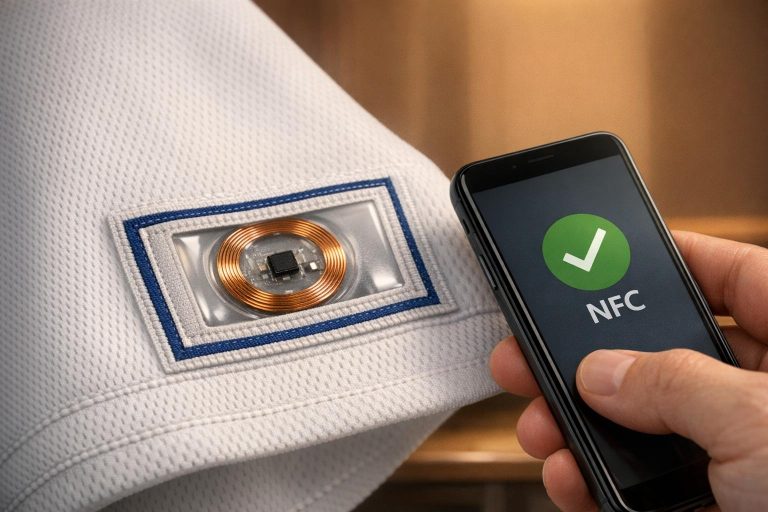
NFC tags in sports uniforms are changing the game. They offer a way to link garments to cloud-based data, enabling updates, anti-counterfeiting, and fan interaction with just a tap of a smartphone. From choosing the right chip type to embedding tags that endure washing, this guide covers the essentials of integrating NFC into custom uniforms.
Key Highlights:
- Tag Types: NTAG213 (fast, basic tasks), NTAG216 (more memory), NTAG424 DNA (high security, longer lifespan).
- Placement: Near the fabric surface (e.g., necklines, hems) for easy scanning. Avoid metallic threads that disrupt signals.
- Durability: Tags withstand washing and sublimation printing but require proper protection during production.
- Programming: Use tools like NFC TagWriter to encode data like URLs, stats, or care instructions. Ensure tags follow the NDEF format for compatibility.
- Maintenance: Track tag IDs in a database for updates and monitor performance through user feedback.
This technology not only secures uniforms but also enables dynamic data sharing and real-time fan engagement.
How to Apply Fabric NFC Tags to Clothing Garments | Authentication Web3 & Digital Product Passports
sbb-itb-4d95ad3
Design Phase Checklist
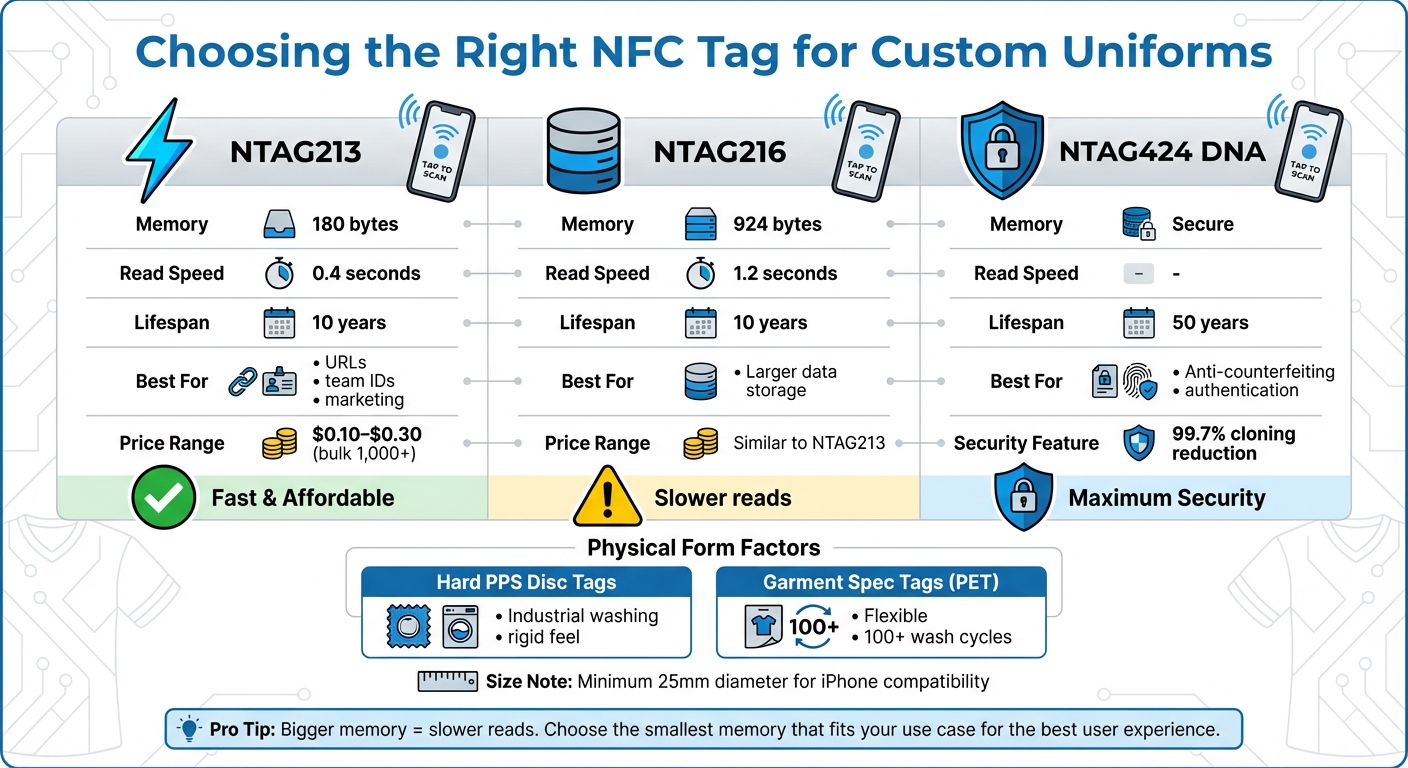
NFC Tag Types Comparison for Sports Uniforms: Memory, Speed, and Lifespan
Choose the Right NFC Tag Type
Selecting the correct NFC chip is crucial for balancing speed, durability, and user experience. For example, NTAG213 chips offer 180 bytes of memory and a quick 0.4-second read time on Android devices, making them perfect for simple tasks like linking to URLs or assigning unique IDs. On the other hand, NTAG216 chips provide significantly more memory – 924 bytes – but come with a slower 1.2-second scan time, which might frustrate users expecting instant results.
If security is a priority, the NTAG424 DNA chip is a great option. It reduces cloning risks by 99.7% and boasts a lifespan of up to 50 years compared to the standard 10 years of other chips. However, keep in mind that it requires an authentication server and costs more.
Physical form also plays a role. For industrial settings, hard PPS disc tags are resilient enough to handle repeated washing but may feel too rigid for soft fabrics. Alternatively, Garment Spec tags made of flexible PET plastic are more comfortable for everyday wear and can endure over 100 domestic wash cycles.
For iPhone compatibility, size matters. Tags smaller than 25 mm in diameter may not consistently trigger the device’s NFC antenna.
"Bigger memory often means slower reads… For user-facing applications, that delay destroys the ‘magic.’ Stick to the smallest memory that fits your use case." – Sophia, Writer, ZealTag
| Tag Type | Memory | Read Speed | Lifespan | Best For |
|---|---|---|---|---|
| NTAG213 | 180 bytes | 0.4 sec | 10 years | URLs, team IDs, marketing |
| NTAG216 | 924 bytes | 1.2 sec | 10 years | Larger data storage |
| NTAG424 DNA | – | – | 50 years | Anti-counterfeiting, authentication |
Once you’ve chosen the chip type, focus on defining the specific data each tag will carry.
Define the Data Payload
NFC tags can act as unique identifiers linked to cloud-based records. This setup makes it easy to update information like player stats, care instructions, or promotional content remotely – no need to reprogram the physical tags.
Common uses include embedding team identification numbers, URLs for video highlights, care tips, or authentication codes. For most purposes, NTAG213 chips with their 180-byte capacity are sufficient to store a simple URL pointing to your cloud database.
After setting the payload, the next step is determining where to place the tags for optimal usability.
Plan Label Placement
Because NFC tags work only at short distances, they must be positioned close to the garment’s surface. Popular spots include the back neck area, inside hems, or behind woven labels – places where users can easily tap their phones.
Proper placement ensures the tags function well and integrate seamlessly with the uniform. Avoid placing them near metallic threads or embroidery, as these materials can reduce the tag’s read range by up to 90%. If metallic elements are unavoidable, consider using on-metal tags with ferrite shielding to maintain performance.
"Don’t use metallic threads in woven labels as they can interfere with the function of the NFC tags." – Seritag
Ensure Compatibility with Sublimation Printing
Standard Garment Spec tags can handle the heat and pressure of sublimation printing, which typically involves temperatures of about 248°F (120°C) for 8 to 12 seconds under 6.6 lbs (3 kg) of pressure. However, to protect the NFC chip, it’s best to apply the tag after sublimation, positioning it behind a woven or iron-on label.
To prevent damage, use padding under the iron to shield the chip from excessive force. Also, ensure the outer label is larger than the NFC tag to provide enough adhesive surface. Always perform a read/write test after pressing to confirm the tag is still functional.
Production Phase Checklist
Source High-Quality NFC Tags
When sourcing NFC tags, stick to reliable brands like NXP (NTAG series), Sony (Felica), or Impinj. Always request official factory datasheets to verify the chip’s origin and technical details. Before committing to bulk orders, test a few samples on both Android and iOS devices to ensure compatibility.
For athletic wear, durability is non-negotiable. Opt for NFC tags with IP67 or IP68 ratings to withstand moisture, sweat, and temperature changes. Copper antennas are a better choice than aluminum, offering superior conductivity and a longer read range.
| Tag Type | Price Range (Bulk 1,000+) | Best For |
|---|---|---|
| Basic Sticker Tags (NTAG213) | $0.10–$0.30 each | Simple URLs, team IDs |
| Waterproof/Hard Discs (IP68) | $1.00–$3.00 each | Industrial washing, high-durability needs |
| Custom Encoding | +$0.10–$0.50 per unit | Pre-programmed tags |
Embed Tags During Label Manufacturing
To integrate NFC tags into garments, embed them during the weaving or lamination stages. Placing the tag behind a sew-on or iron-on label helps shield it from wear and tear during use and washing.
For sportswear, use garment specification tags that can endure up to 100 domestic washes. If zero failures are a priority, consider hard disc tags made of PPS plastic, typically 20–25mm in size. To ensure reliable scanning, a tag size of at least 30mm is recommended.
"Most garment tags – both disc and label – would be attached behind a sew-on or iron-on label. Sew-on is typically the best choice for all tags." – Seritag
Initially, stick to generic tag encoding for all product lines. Transition to unique tags for specific sizes and colors as manufacturing facilities adapt to smart label technology. After lamination or heat application, conduct a read/write test to confirm the chip’s functionality.
Test Tag Durability
Durability testing is crucial. Perform repeated wash tests, keeping in mind an expected failure rate of around 0.5% after five high-temperature washes.
Standard tests should include thermal and humidity cycling, or compliance with the ISO6330 standard for textile washing. Additionally, ensure the tags can endure the heat applied during lamination or iron-on processes. Using a padded iron face can protect the NFC chip from direct pressure during application.
Once durability checks are complete, verify the tags remain functional when embedded in sublimated uniforms.
Verify Compatibility with Sublimated Uniforms
After embedding and durability testing, confirm the NFC tags work seamlessly with sublimated uniforms. Wooter Apparel uniforms, made from 180gsm mock mesh polyester with fully sublimated graphics, are designed to resist cracking and fading. Therefore, precise alignment and placement of tags are crucial.
Position the tags close to the fabric surface to optimize scan distance for smartphone users. The woven label or pocket housing the tag should be slightly larger than the tag itself to allow for a sewing margin. This prevents damage from needles during production. After assembly, perform a final read/write test to ensure the tags function as intended.
Integration and Testing Checklist
This phase ensures that NFC integrations meet the necessary quality and durability standards for custom sports uniforms, building on the design and production work already completed.
Program NFC Tags
Start by choosing a reliable tool for programming your NFC tags. Options like NFC Tools or NFC TagWriter by NXP are excellent for encoding data. Once you’ve selected your tool, enable NFC in your smartphone’s settings, open the app, and select the "Write" or "Create" function. You can then add the desired data – whether it’s a URL linking to a player’s profile, plain text for team IDs, or contact info for equipment managers.
To write the data, tap your smartphone against the NFC tag. On Android, align the phone’s center with the tag, while iPhone users should use the top edge. Before programming a large batch, confirm whether your tags are reprogrammable – some inexpensive tags are write-once and can’t be updated later. Testing a small sample first can save you from wasting inventory. Also, keep metal objects or electronics away during programming to avoid connectivity problems.
Conduct Read/Write Testing
Once programmed, test the NFC tags on both Android and iOS devices. Android devices generally support automatic background tag reading, while iPhones require models as recent as the iPhone 7 or newer. Ensure the scanning range is within a few centimeters and simulate real-world usage to confirm functionality.
Make sure your tags are formatted using the NDEF (NFC Data Exchange Format) standard. This ensures compatibility with most modern smartphones, allowing them to retrieve data without needing a special app. During testing, show users the best contact points for their devices – on iPhones, this is the top edge, and on Android devices, it’s typically the middle section.
If a tag doesn’t work, troubleshoot by removing conditional settings and rewriting the tag to pinpoint whether the issue lies with the hardware or software. Also, confirm that your tag has enough storage capacity for your data. For reference, NTAG213 holds 144 bytes, NTAG215 provides 504 bytes, and NTAG216 offers 888 bytes of memory.
Validate Data Security
To protect sensitive data, use the security features in your programming app. Options like "Set Password" or "Lock" can help prevent unauthorized access or tampering. Password protection can also limit reprogramming for added control.
After setting up security, test the lock functionality by attempting to reprogram the tag with a different device. For permanent security, you can lock the tag after the initial data write, making it read-only and tamper-proof.
High-quality NFC chips are designed for longevity, with data retention of at least 10 years. This ensures that your security measures will last as long as the uniform. Additionally, check the chip type during testing. NTAG chips are suitable for basic identification, but MIFARE chips are better for secure transactions and access control.
Once programming and security are validated, move on to field testing to assess real-world performance.
Perform Field Tests
Real-world testing is essential before delivering uniforms to teams. Test the NFC tags while embedded in actual Wooter Apparel uniforms to evaluate scanning range, read speed, and overall reliability during movement. Experiment with different distances and angles to identify the best scanning positions for smartphone users.
Assess tag performance under various conditions, such as exposure to sweat, temperature changes during outdoor games, and physical contact during play. Document any issues you encounter, noting the device models, tag placements, and environmental factors involved.
Gather feedback from test users about their scanning experience. For instance, ask whether the tags are easy to locate and if the read distance allows for smooth check-ins. This feedback helps fine-tune tag placement and data formatting before full deployment.
Deployment and Maintenance Checklist
After completing field tests, the next step is ensuring a smooth deployment and establishing a maintenance routine for your NFC-enabled Wooter Apparel uniforms. This phase ensures your uniforms are ready for consistent, long-term use.
Document Tag IDs
Keeping track of NFC tag identification numbers is essential for effective inventory management. Decide whether your tags will be generic (all the same), unique to a product line, or specific to each garment.
Each NFC tag serves as an identifier linked to information stored in a cloud-based database. As Seritag emphasizes:
"Seritag very strongly recommend that NFC tags should be used as an ID rather than a data store".
When ordering tags, ask your supplier for a UID scan, which provides a digital spreadsheet of all the Unique Identification numbers in your batch. Upload these UIDs to a cloud database or NFC tag management platform. These platforms allow you to connect tag IDs to garment data, manage URL redirects, and track scan activity. Also, ensure woven labels avoid metallic threads to maintain NFC readability.
Train Staff on NFC Usage
Your team needs to be familiar with how NFC-enabled uniforms work. Training should focus on the "tap-to-access" feature that uses standard NFC-enabled smartphones – no additional app required.
For those handling deployment, provide instruction on proper tag application methods as outlined by the manufacturer to prevent heat damage to NFC chips. Staff should also learn how to use tag management software for remote updates. As ETRNL explains:
"Changes made in the Page Builder will reflect on all your Keys instantly".
Make sure staff know the exact location of each tag – whether behind a woven patch, inside a hem, or elsewhere – so they can guide players and coaches on proper scanning techniques. Additionally, educate them on the tag’s durability, such as its resistance to washing and drying, so they can troubleshoot effectively if issues arise.
Monitor Performance and Gather Feedback
Consistent monitoring helps identify and address issues early. Regularly inspect uniforms for physical damage caused by chemicals, water, or heat. Use your tag management system to track scan activity and flag any tags with inconsistent performance.
To maintain security, implement password protection and avoid storing sensitive plain-text commands on tags. Instead, use random identification numbers or proxy IDs that trigger actions in your secure backend system. As Seritag advises:
"Start simple, then grow your NFC project".
User feedback is equally important. Monitor reports about scanning difficulties or issues with tag placement. If multiple users report challenges with tags in specific areas, adjust placement for future batches. These steps ensure reliability and pave the way for ongoing updates.
Schedule Periodic Reprogramming
Use performance data and user feedback to schedule regular updates for your NFC tags. These updates can include roster changes, seasonal updates, or special event information. Since the tags act as IDs pointing to cloud-based data, most updates can be done remotely through your management platform.
For tags requiring physical reprogramming, leverage proxy items in your software. Program tags with a static unique ID that triggers a "proxy" rule in your database. This allows updates to player assignments or status without needing to reprogram the physical tag, making it ideal for tracking maintenance or transit history.
Keep in mind that NTAG213 chips last about 10 years, while more durable chips like ICODE SLIX2 can last up to 50 years. For uniforms exposed to harsh environments or industrial washing, use tags encased in ABS, Nylon, or PPS to protect the chip. If your uniforms include metal components like buttons or zippers, opt for "On-Metal" tags with ferrite barriers to prevent interference.
Conclusion
NFC tags have revolutionized how teams handle authentication, management, and fan engagement, seamlessly integrating across four key phases: design, production, integration/testing, and deployment/maintenance.
As Walkouts explains:
"NFC technology provides real-time confirmation of a jersey’s authenticity, offering an instant and reliable way to ensure its legitimacy."
This embedded technology eliminates the need for traditional paper-based authentication, which can be easily misplaced or separated from the garment. Instead, NFC tags stay permanently attached, offering a secure and convenient solution. Beyond authentication, NFC technology allows teams to share interactive content – like match highlights, player stats, or certification details – with just a simple tap of a smartphone.
Wooter Apparel exemplifies this innovation by managing the entire NFC uniform production process. They use fully sublimated printing for vibrant, long-lasting designs and maintain a strong reputation for quality and efficiency. Their design team ensures precise color matching and brand consistency, even accounting for details like the 200+ shades of orange in the Pantone system. Every order undergoes professional stitching and a final Quality Assurance check before shipping, ensuring a dependable, high-quality product.
To preserve NFC functionality, proper care is essential. Store uniforms in a cool, dry environment and avoid bending the tag excessively to prevent damage.
FAQs
Do I need an app to scan the NFC label?
Most NFC-enabled smartphones can read NFC tags, including those found on clothing, without needing a separate app. All you have to do is tap your phone against the tag, and the content should appear. While some providers might offer apps for extra features, basic scanning generally works just fine without one.
What’s the best place to sew the NFC label on a uniform?
The best spot to sew an NFC label onto a uniform is usually on the sleeve. This placement ensures the label is easy to access and scan while keeping the uniform’s design and usability intact.
How do I update the info without rewriting every tag?
You can change the information on an NFC tag by reprogramming it with NFC-compatible apps or tools. Apps such as NFC Tools or NFC TagWriter make it easy to overwrite the tag’s existing data. Additionally, some NFC tags are designed for dynamic updates, allowing you to adjust the stored information without needing a new tag. All you need is an NFC reader/writer connected to a compatible device to make the updates.