
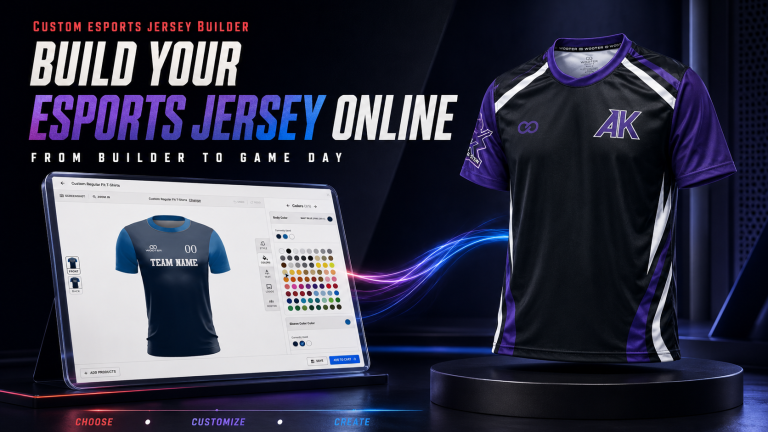
Your esports jersey should do more than display a logo.
It should make your squad recognizable in a tournament lobby, on a livestream, in team photos, and across social media.
But turning a gaming identity into wearable apparel can get complicated fast. Colors clash. Sponsor logos crowd the design. Gamer tags become unreadable. A jersey that looks sharp on a large screen disappears when viewed as a thumbnail.
That is where an esports jersey builder changes the process.
With the Wooter Custom Apparel Builder, you can start with a customizable template, apply your team colors, upload your logo, and add individual names or gamer tags. Instead of explaining your idea through scattered messages, you can begin turning it into a visible jersey concept.
Already have your team colors and logo?
Bring them together in the Wooter Builder and start shaping your esports jersey.
What Is an Esports Jersey Builder?
An esports jersey builder is an online customization tool that helps gaming teams create their own jersey design.
You begin with a jersey style or template. From there, you can customize important elements such as:
- Team colors
- Team logo
- Player gamer tags
- Numbers
- Sponsor logos
- Design details
The Wooter Builder makes the jersey the starting point, not the final mystery.
You can explore different directions before moving forward. That gives teams a clearer way to decide what looks right, what needs changing, and how the design supports their identity.
What Makes a Strong Esports Jersey Design?
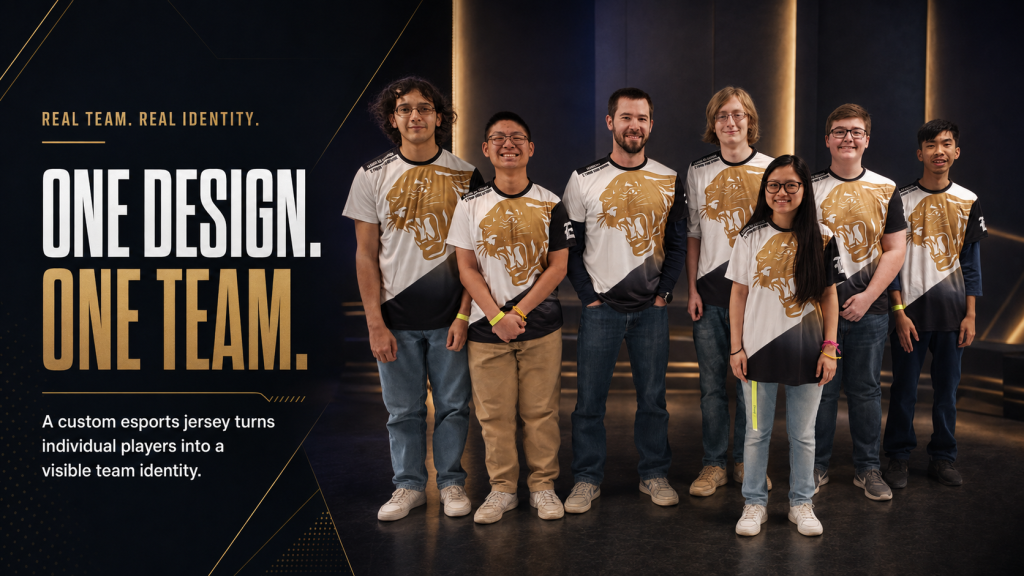
A good esports jersey looks exciting.
A great esports jersey stays recognizable everywhere.
It should work when the player is:
- Competing on stage
- Sitting behind a gaming desk
- Appearing on a livestream
- Walking into an event
- Posting a roster announcement
- Taking team photographs
- Creating short-form video content
Traditional sports uniforms are often viewed from a distance and in motion. Esports jerseys are frequently seen from the waist or chest upward.
That changes the design priorities.
The team logo, collar, shoulders, upper chest, sponsor marks, and gamer tags receive more attention. Every part of the jersey must earn its space.
Build Your Esports Jersey Brief First
Do not enter the Builder without a direction.
A short creative brief prevents random colors, crowded logos, and endless revisions. It also helps everyone on the roster make decisions around the same identity.
Complete these details before designing:
Build Your Esports Jersey Brief
Turn your ideas into a clear jersey plan. Complete the brief now or return later to finish it before opening the Wooter Builder.
Your Esports Jersey Brief
Keep the brief focused.
Three strong colors usually create a more controlled identity than six competing colors. One dominant visual direction is also more memorable than several unrelated effects.
Once the brief is ready, the Builder becomes the creative arena.
How to Design an Esports Jersey With the Wooter Builder?
1. Choose the Right Jersey Style
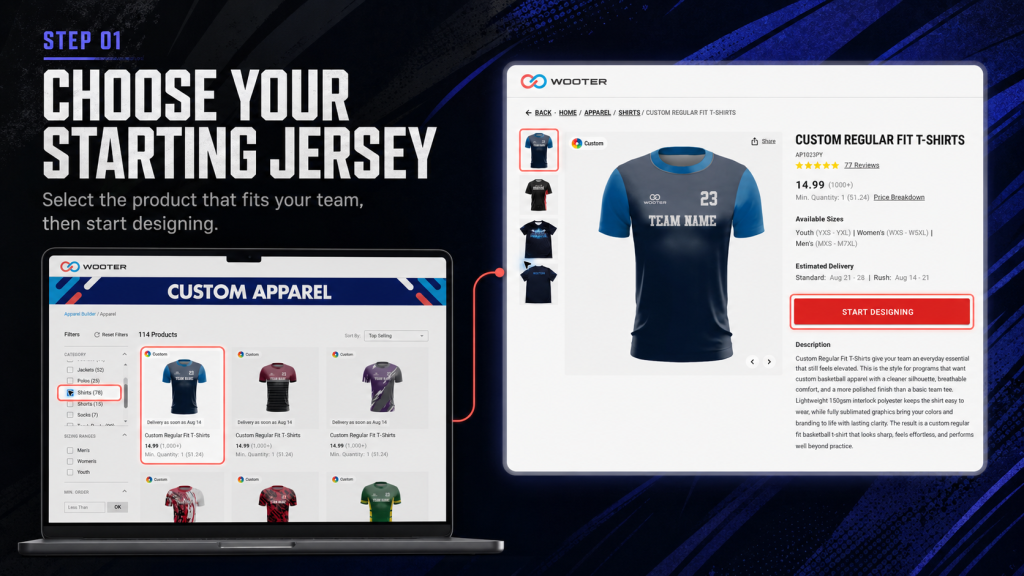
Start with the garment your players will actually want to wear.
A short-sleeve esports jersey creates a classic competitive look. It works well for tournaments, team photos, streams, and gaming events.
A long-sleeve esports jersey creates more visual space and can produce a stronger stage presence. The sleeves can also support secondary design elements.
Think beyond appearance.
Consider the environment, how long players will wear the jersey, and whether it needs to work under stage lights, during travel, or across extended gaming sessions.
2. Pick a Template With a Clear Visual Direction
A template gives your esports jersey structure.
Instead of building every detail from zero, you can choose a starting layout and shape it around your team. Look for a template that matches the personality of your gaming brand.
An aggressive team might choose sharp lines and fast directional movement.
A futuristic squad might prefer cleaner geometry and controlled neon accents.
A creator-led team may benefit from a simpler design that keeps the logo and player identity highly visible on camera.
Do not select the busiest template simply because it looks exciting alone. Choose the one that gives your team name, logo, and sponsors room to breathe.
3. Build a Color System, Not a Color Explosion
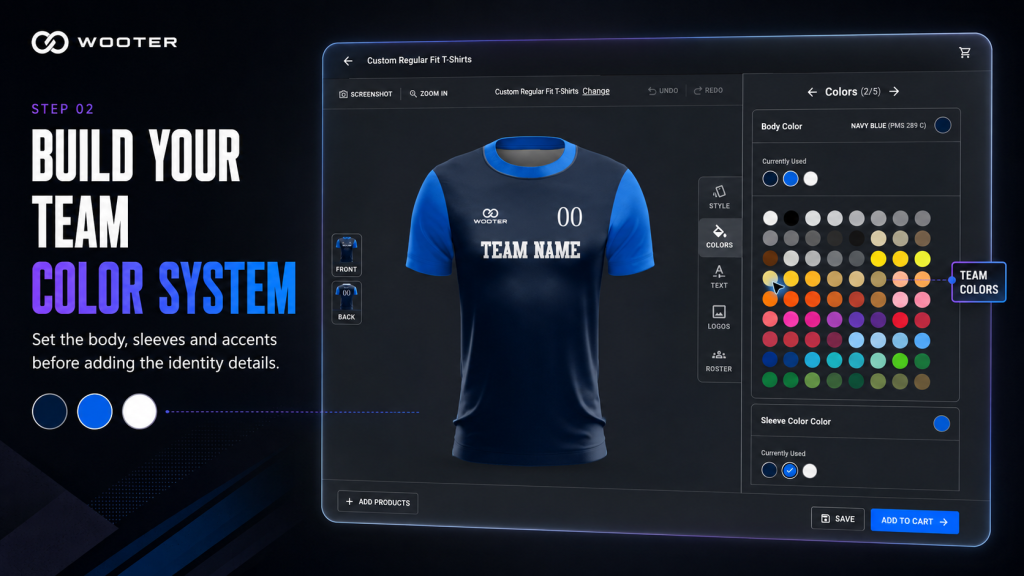
Your jersey colors should look intentional.
Choose:
- One dominant team color
- One supporting color
- One accent color
The dominant color creates recognition. The supporting color separates important areas. The accent color highlights smaller details.
Contrast matters more than complexity.
If your team is still defining its palette, use this breakdown of how to choose colors for gaming jerseys to compare contrast, hierarchy, and screen visibility before finalizing the design.
A dark gamer tag on a dark jersey may disappear. Before finalizing the palette, test the text and background colors with the Adobe Color Contrast Checker to confirm that gamer tags and smaller details remain readable.
Use the Builder to compare combinations before committing to one direction.
4. Upload Your Team Logo
Your logo should be one of the strongest elements on the jersey.
Upload the clearest approved version available. Avoid screenshots, blurred graphics, or images pulled from social media.
Place the logo where it remains visible when the player is sitting down. The chest is usually valuable because it appears in streams, interviews, portraits, and team announcements.
Before moving forward, ask:
- Is the logo immediately recognizable?
- Does it contrast with the jersey?
- Is there enough space around it?
- Does it compete with a sponsor?
- Can it still be identified at a smaller size?
Use only logos and artwork your team owns or has permission to reproduce.
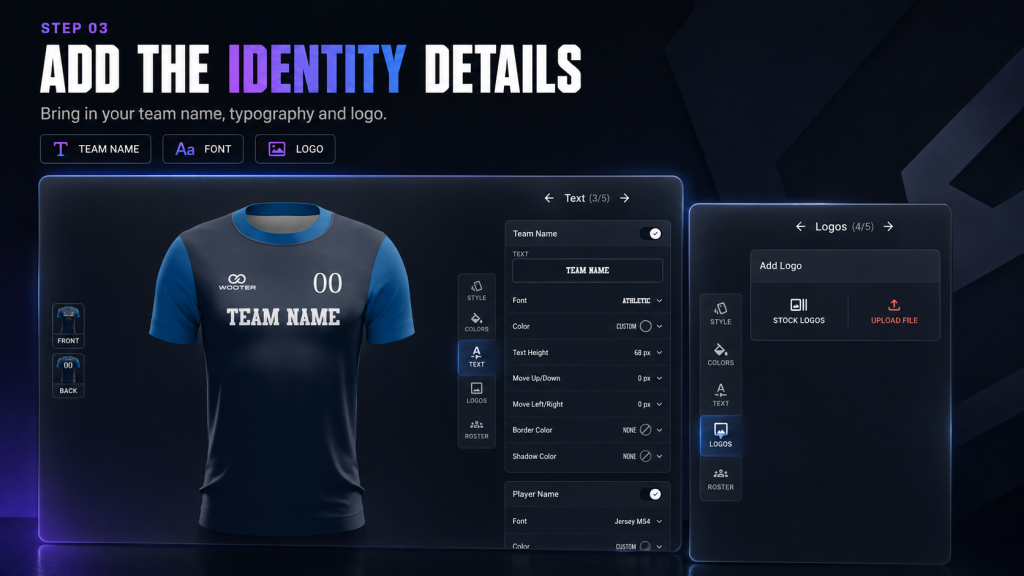
5. Add Gamer Tags That Players Can Actually Read
Gamer tags are not ordinary uniform names.
They are player identities.
A well-placed gamer tag connects the physical jersey to the name supporters see in matches, streams, scoreboards, and online communities.
Keep each tag clear and readable. Avoid thin lettering, excessive effects, or fonts that make similar characters difficult to distinguish.
Check longer player names carefully. A gamer tag that works at six characters may become crowded at twelve.
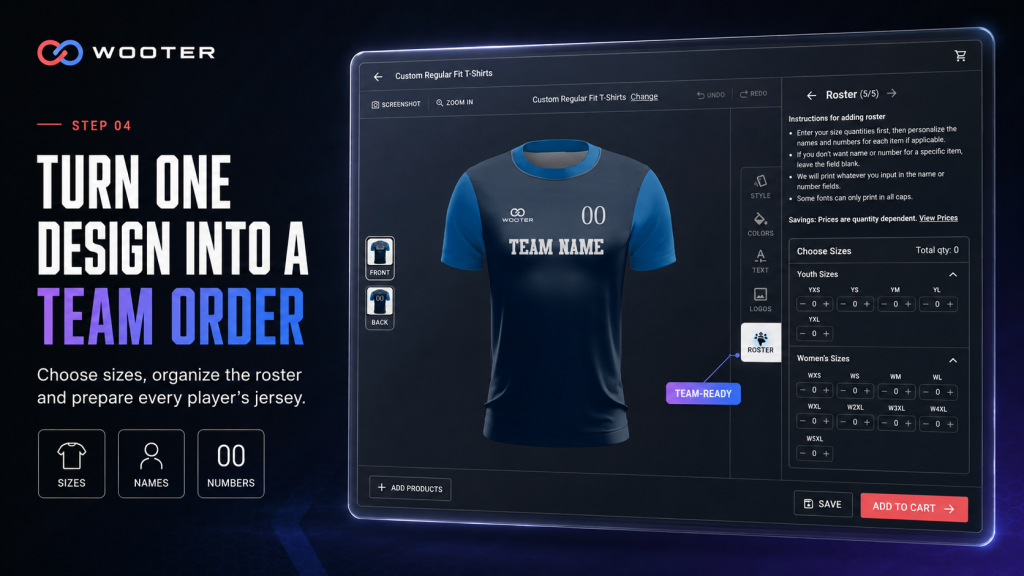
For a full roster, use a structured player list and confirm every spelling before approval. Wooter explains how organized proofs can reduce errors in sizes, names, and numbers.
The goal is simple: viewers should be able to recognize the player without decoding the typography.
Give Every Sponsor the Right Level of Attention
Sponsor logos can make an esports jersey feel established.
Too many sponsor logos can make it feel chaotic.
Create a hierarchy before placing them:
- Team identity
- Primary sponsor
- Secondary sponsors
- Supporting marks
The team should remain recognizable first.
Reserve the most visible sponsor position for the main partner. Move smaller partnerships to secondary areas where they remain noticeable without overpowering the design.
The Wooter Builder helps you see how these elements interact before you finalize the concept. Use that visibility to test scale, contrast, spacing, and balance.
For more detail, read Wooter’s article on how to place sponsor logos on sports uniforms.
Run the Three-Part Stream Test
An esports jersey should not be approved only at full size.
It must also survive the screens where people will actually see it.
Test 1: Full-Jersey View
Look at the complete front and back.
Check the balance between the pattern, colors, team logo, gamer tag, number, and sponsors. Nothing should look accidentally empty or heavily crowded.
Test 2: Seated Stream View
Imagine the player sitting behind a desk.
The lower half of the jersey may disappear. That means the upper chest, collar, shoulders, and sleeves must carry the identity.
If the most important detail sits too low, viewers may never see it.
Test 3: Mobile Thumbnail View
Shrink the jersey image.
Can you still identify the team color and logo? Does the design retain a recognizable shape? Or does everything blend into visual noise?
The thumbnail test is brutal, but useful.
If the identity survives at a small size, it is more likely to work across social posts, stream cards, roster graphics, and tournament coverage.
Designing for One Creator vs an Entire Esports Team
The Builder can support different esports identities, but the design strategy should match the user.
| Solo Creator or Streamer | Full Esports Team |
|---|---|
| Creator name leads the design | Team name and crest lead the design |
| Personal logo receives priority | Shared branding remains consistent |
| One gamer tag may be enough | Every player needs accurate personalization |
| Sponsor layout can be individual | Sponsor placement should remain consistent |
| Design can reflect one personality | Design must represent the entire roster |
A solo creator can be more experimental.
A full team needs stronger rules. Colors, logo placement, sponsor hierarchy, and typography should remain consistent across every jersey. Player gamer tags can change, but the team identity should not.
Esports Jersey Design Mistakes to Avoid
Making Every Element Compete
When the logo, pattern, gamer tag, number, and sponsors all demand equal attention, none of them wins.
Choose a clear visual hierarchy.
Using Too Many Colors
More colors do not automatically create more energy. They often weaken recognition.
A controlled palette is easier to remember.
Placing Key Branding Too Low
A logo may look fine on a full jersey but disappear behind a desk during streams.
Prioritize the upper-body view.
Choosing Style Over Readability
Complex typography may look futuristic, but it can destroy gamer-tag readability.
If viewers cannot read it quickly, simplify it.
Forgetting the Back
The front may dominate livestreams, but the back appears in player walkouts, event photography, short-form videos, and offline activations.
Treat it as part of the complete identity.
Skipping the Final Roster Check
One incorrect gamer tag can turn an exciting delivery into an avoidable problem.
Confirm every spelling, number, and size before submitting the order.
Final Esports Jersey Checklist
Before approving your design, confirm:
- The team logo is clear at full and thumbnail size
- The color palette matches the wider team brand
- Gamer tags are spelled correctly
- Every gamer tag remains readable
- Sponsor logos follow the agreed hierarchy
- Important elements remain visible in a seated view
- The front and back feel connected
- The design works for both competition and content
- All uploaded artwork is approved for use
- The final roster details have been checked
If the jersey passes every point, you are no longer looking at random team apparel.
You are looking at a wearable gaming identity.
Frequently Asked Questions About Esports Jersey Builder
Can I design an esports jersey online?
Yes. An online esports jersey builder lets you choose a customizable style and add elements such as team colors, logos, names, numbers, and gamer tags.
Can every player have a different gamer tag?
Yes. Individual player personalization can give each jersey a unique gamer tag while preserving the team’s shared design.
Can sponsor logos be added to esports jerseys?
Yes. Sponsor logos can be incorporated into the jersey design. Create a clear hierarchy so the main sponsor remains visible without overpowering the team identity.
What should I prepare before using an esports jersey builder?
Prepare your team name, approved logo files, preferred colors, gamer tags, player details, and sponsor logos. A simple creative brief will make the design process faster and more focused.
How do I know whether my esports jersey will look good on a stream?
Use the Stream Test. Review the complete jersey, crop it to a seated upper-body view, and shrink it to mobile-thumbnail size. The logo, colors, and team identity should remain recognizable in all three views.
Turn Your Gaming Identity Into a Jersey
Your team already has a name.
It has players, rivalries, supporters, colors, and a reason to compete.
Now give that identity something people can see.
The Wooter Esports Jersey Builder gives you a direct starting point. Once your concept is ready, explore how Wooter works to understand the path from your draft design and mockup approval to production.
Do not settle for a jersey that merely includes your logo.
Create one that looks like your team belongs on the main stage.